Notice: Function _load_textdomain_just_in_time was called incorrectly. Translation loading for the cmsmasters-content-composer domain was triggered too early. This is usually an indicator for some code in the plugin or theme running too early. Translations should be loaded at the init action or later. Please see Debugging in WordPress for more information. (This message was added in version 6.7.0.) in /home/billezya/public_html/lpm.backup/wp-includes/functions.php on line 6260

Notice: Function _load_textdomain_just_in_time was called incorrectly. Translation loading for the cookie-law-info domain was triggered too early. This is usually an indicator for some code in the plugin or theme running too early. Translations should be loaded at the init action or later. Please see Debugging in WordPress for more information. (This message was added in version 6.7.0.) in /home/billezya/public_html/lpm.backup/wp-includes/functions.php on line 6260

Notice: Function _load_textdomain_just_in_time was called incorrectly. Translation loading for the mailpoet domain was triggered too early. This is usually an indicator for some code in the plugin or theme running too early. Translations should be loaded at the init action or later. Please see Debugging in WordPress for more information. (This message was added in version 6.7.0.) in /home/billezya/public_html/lpm.backup/wp-includes/functions.php on line 6260

Notice: Function _load_textdomain_just_in_time was called incorrectly. Translation loading for the the-events-calendar domain was triggered too early. This is usually an indicator for some code in the plugin or theme running too early. Translations should be loaded at the init action or later. Please see Debugging in WordPress for more information. (This message was added in version 6.7.0.) in /home/billezya/public_html/lpm.backup/wp-includes/functions.php on line 6260

Notice: Function _load_textdomain_just_in_time was called incorrectly. Translation loading for the wpforms-lite domain was triggered too early. This is usually an indicator for some code in the plugin or theme running too early. Translations should be loaded at the init action or later. Please see Debugging in WordPress for more information. (This message was added in version 6.7.0.) in /home/billezya/public_html/lpm.backup/wp-includes/functions.php on line 6260

Notice: Function _load_textdomain_just_in_time was called incorrectly. Translation loading for the wordpress-seo domain was triggered too early. This is usually an indicator for some code in the plugin or theme running too early. Translations should be loaded at the init action or later. Please see Debugging in WordPress for more information. (This message was added in version 6.7.0.) in /home/billezya/public_html/lpm.backup/wp-includes/functions.php on line 6260

Notice: Function _load_textdomain_just_in_time was called incorrectly. Translation loading for the startup-company domain was triggered too early. This is usually an indicator for some code in the plugin or theme running too early. Translations should be loaded at the init action or later. Please see Debugging in WordPress for more information. (This message was added in version 6.7.0.) in /home/billezya/public_html/lpm.backup/wp-includes/functions.php on line 6260

Warning: Cannot modify header information - headers already sent by (output started at /home/billezya/public_html/lpm.backup/wp-includes/functions.php:6260) in /home/billezya/public_html/lpm.backup/wp-includes/feed-rss2.php on line 8
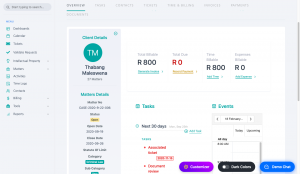
Matter Management Archives - BIlletterie LPM https://lpm.backup.billetterieservicedesk.com LPM Thu, 18 Feb 2021 12:50:43 +0000 en-US hourly 1 https://wordpress.org/?v=7.1.3 https://lpm.backup.billetterieservicedesk.com/wp-content/uploads/2022/03/cropped-logo-32x32.png Matter Management Archives - BIlletterie LPM https://lpm.backup.billetterieservicedesk.com 32 32 How to view a matter details https://lpm.backup.billetterieservicedesk.com/knowledge-base/how-to-view-a-matter-details/ Thu, 18 Feb 2021 12:50:43 +0000 https://billetteriesoftware.com/?post_type=epkb_post_type_1&p=17053 Procedure Role required: Admin, Resolution agent Navigate to Matters and hover over the Matters tab. Click on a case number.  The Matter details will be displayed on the overview tab.

The post How to view a matter details appeared first on BIlletterie LPM.

]]>
Procedure

Role required: Admin, Resolution agent

  1. Navigate to Matters and hover over the Matters tab.
  2. Click on a case number.
  3.  The Matter details will be displayed on the overview tab.

The post How to view a matter details appeared first on BIlletterie LPM.

]]>
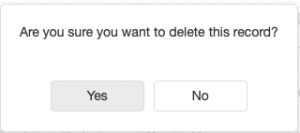
How to delete a matter https://lpm.backup.billetterieservicedesk.com/knowledge-base/how-to-delete-a-matter/ Thu, 18 Feb 2021 12:06:54 +0000 https://billetteriesoftware.com/?post_type=epkb_post_type_1&p=17049 Procedure Role required: Admin, Resolution agent Navigate to Matters and hover over the Matters tab. Select a matter to delete and click the delete button Click the YES button.
The post How to delete a matter appeared first on BIlletterie LPM.

]]>
Procedure

Role required: Admin, Resolution agent

  1. Navigate to Matters and hover over the Matters tab.
  2. Select a matter to delete and click the delete button
  3. Click the YES button.

The post How to delete a matter appeared first on BIlletterie LPM.

]]>
How to modify a matter https://lpm.backup.billetterieservicedesk.com/knowledge-base/how-to-modify-a-matter/ Fri, 12 Feb 2021 13:34:22 +0000 https://billetteriesoftware.com/?post_type=epkb_post_type_1&p=17038 Procedure Role required: Admin, Resolution agent Navigate to Matters and hover over the Matters tab. Select a Matter to edit. Edit the relevant information. Click Save

The post How to modify a matter appeared first on BIlletterie LPM.

]]>
Procedure

Role required: Admin, Resolution agent

  1. Navigate to Matters and hover over the Matters tab.
  2. Select a Matter to edit.
  3. Edit the relevant information.
  4. Click Save

The post How to modify a matter appeared first on BIlletterie LPM.

]]>
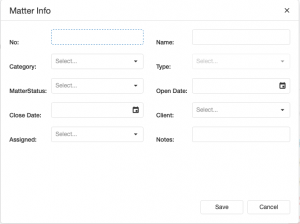
How to create a matter https://lpm.backup.billetterieservicedesk.com/knowledge-base/how-to-create-a-matter/ Tue, 09 Feb 2021 10:07:22 +0000 https://billetteriesoftware.com/?post_type=epkb_post_type_1&p=17033 Procedure Role required: Admin, Resolution agent Navigate to Matters and hover over the Matters tab. Click Add new button Fill in the matter details on the form fields: Click Save

The post How to create a matter appeared first on BIlletterie LPM.

]]>
Procedure

Role required: Admin, Resolution agent

  1. Navigate to Matters and hover over the Matters tab.
  2. Click Add new button
  3. Fill in the matter details on the form fields:
  4. Click Save

The post How to create a matter appeared first on BIlletterie LPM.

]]>