

How Can We Help?
How to Brand the Organisation
Procedure
Role required: Admin
- Navigate to the Admin panel > Branding
- On the branding form, fill in the following fields as appropriate:
| Field | Description |
| Name | Unique name of the branding |
| Attach Logo | Attach an image of the company logo |
| Header Background colour | Background color of the header of the system. Use Hexadecimal Code .e.g #ffffff |
| Header icons colour | Colour of the icons on the header . Use Hexadecimal Code .e.g #ffffff |
| Header button colour | Colour of the button on the header . Use Hexadecimal Code .e.g #ffffff |
| Header button colour text | Colour of the button on the header . Use Hexadecimal Code .e.g #ffffff |
| User profile background colour left | Colour of the button on the header . Use Hexadecimal Code .e.g #ffffff |
| User profile background colour right | Background colour of the user profile on the right side . Use Hexadecimal Code .e.g #ffffff |
| User profile text colour | Background colour of the user profile on the left side . Use Hexadecimal Code .e.g #ffffff |
| Is active | To use a branding , this field must be selected |
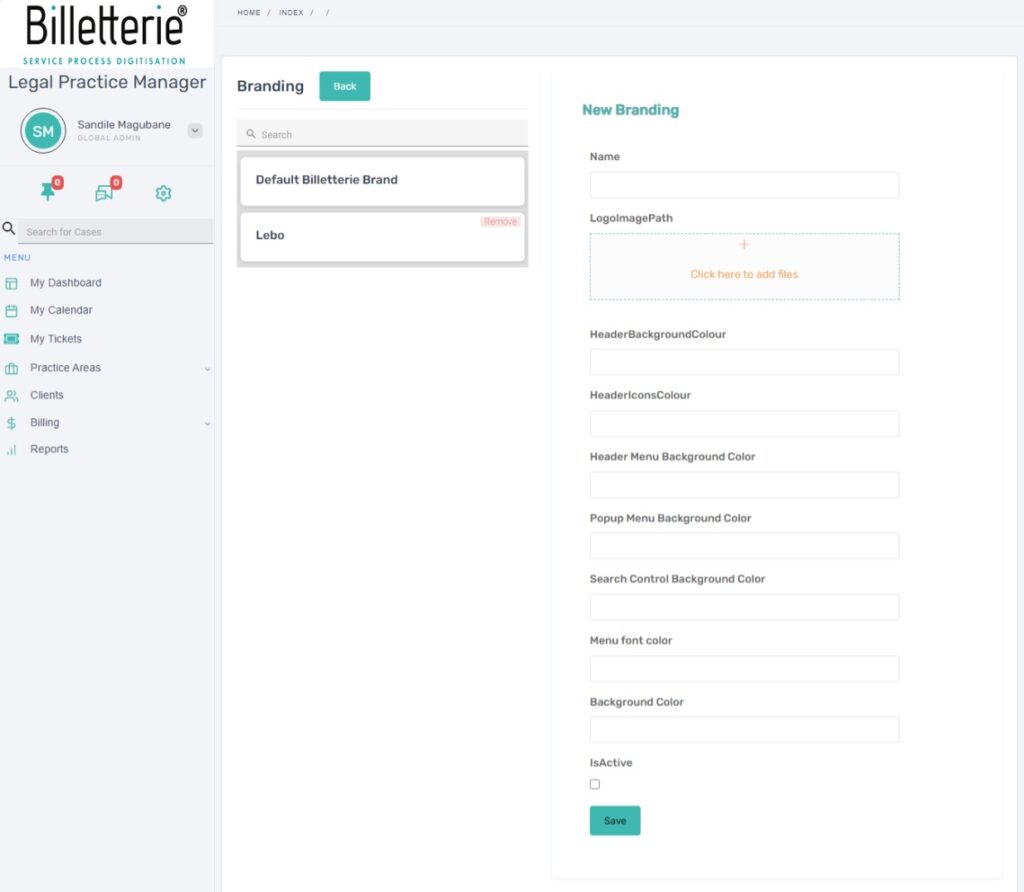
- Click Save